Pattern Management Guide
Complete guide for creating and managing organizational deployment patterns with the DevOps AI Toolkit.
Overview
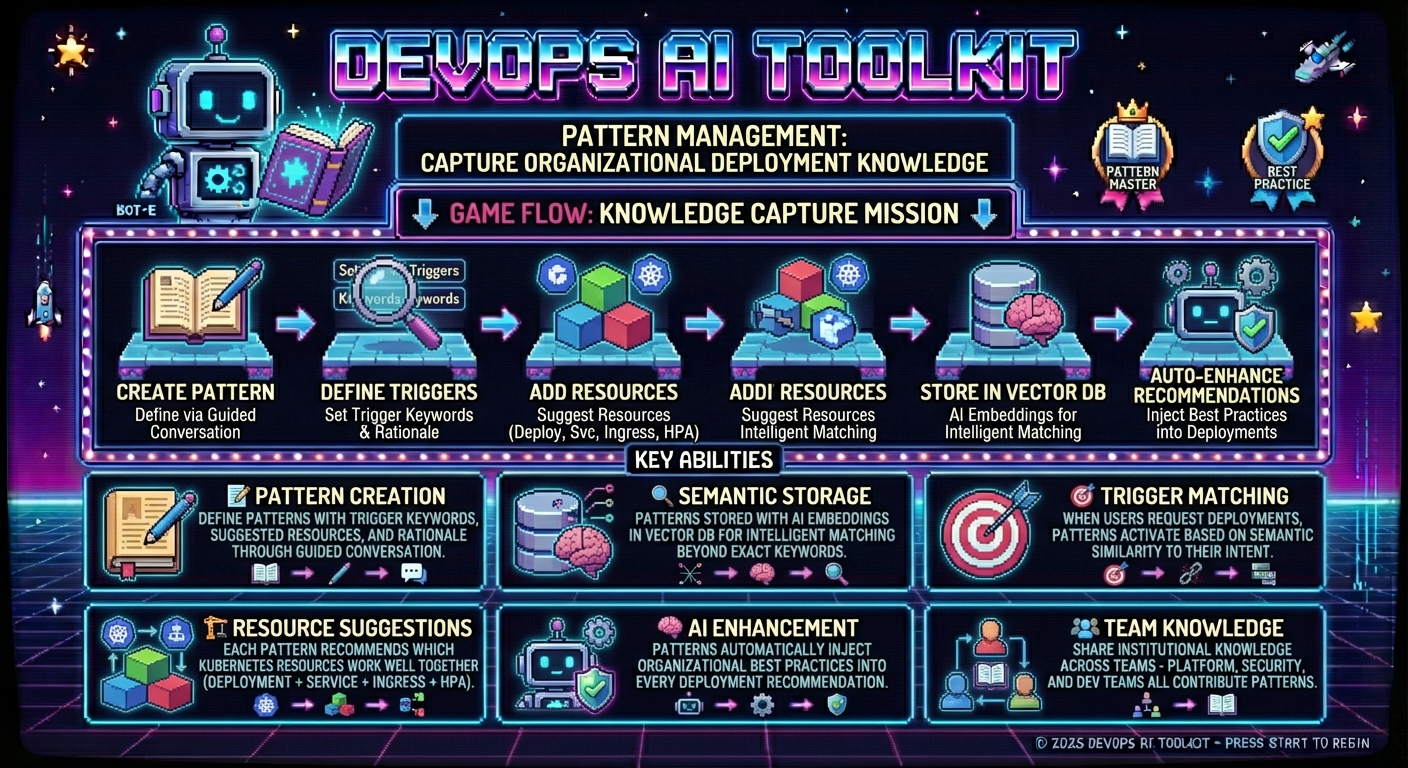
Pattern Management enables platform engineers and architects to capture organizational deployment knowledge as reusable patterns. These patterns automatically enhance AI deployment recommendations, ensuring consistency with your team's best practices and organizational standards.
What is Pattern Management?
Pattern Management allows you to:
- Create deployment patterns that capture your organization's preferred resource combinations
- Store patterns semantically using Vector DB technology for intelligent matching
- Enhance AI recommendations with organizational context and best practices
- Share institutional knowledge across teams through standardized deployment approaches
Understanding Organizational Data Types
Pattern Management works alongside Capability Management and Policy Management to provide comprehensive organizational intelligence for AI recommendations.
Quick Overview:
- Capabilities: What resources can do (required foundation)
- Patterns: What resources to deploy together (organizational preferences)
- Policies: How resources should be configured (governance requirements)
For a complete understanding of how these three types work together, see the Organizational Data Concepts Guide.
How It Works
- Pattern Creation → Platform engineers define deployment patterns with triggers and resource recommendations
- Semantic Storage → Patterns are stored with AI-generated embeddings for intelligent matching
- AI Integration → When users request deployments, relevant patterns automatically enhance recommendations
- Continuous Learning → Patterns improve recommendation quality over time through usage (planned for future versions)
Prerequisites
Before using Pattern Management, ensure you have:
Required Setup
- DevOps AI Toolkit MCP server configured (see MCP Setup Guide)
- Vector DB service (Qdrant) for pattern storage
- API keys for AI models and embedding providers (see AI Model Configuration) can be set as environment variables or in
.mcp.json
For complete setup instructions, see the MCP Setup Guide.
Configuration
Vector Database Setup
Pattern Management requires a Vector DB service for semantic pattern storage and retrieval.
Qdrant Cloud (Recommended)
- Sign up at Qdrant Cloud
- Create a cluster (free tier works fine for pattern storage)
- Get connection details:
- URL from cluster dashboard
- API key from cluster settings
- Add to
.mcp.jsonenvironment variables
Local Qdrant
# Run local Qdrant with Docker (detached/background)
docker container run --detach --name qdrant --publish 6333:6333 --volume $(pwd)/tmp/qdrant_storage:/qdrant/storage qdrant/qdrant
Configuration:
"env": {
  "QDRANT_URL": "http://localhost:6333"
}
Test Connectivity:
# Verify Qdrant is responding
curl http://localhost:6333/healthz
Embedding Service Setup
For semantic pattern matching, configure an embedding provider:
Embedding Provider Configuration
The toolkit supports multiple embedding providers (OpenAI, Google, Amazon Bedrock) for enhanced semantic search.
📖 Complete Embedding Provider Setup Guide - Choose your provider, set API keys, and configure dimensions.
Note: An embedding provider is required for pattern management. The system cannot store or search patterns without embedding generation capabilities.
Pattern Management Operations
All pattern management is done through natural conversation with your AI assistant. The system provides a guided workflow for creating comprehensive patterns.
Creating Organizational Patterns
Start Pattern Creation:
I want to create a new organizational deployment pattern
The AI assistant will guide you through a step-by-step workflow:
Step 1: Pattern Description
The assistant will ask for a clear description of your pattern:
Example:
Assistant: What deployment capability does this pattern provide? I need a capability name (2-4 words).

You: stateless web applications
Step 2: Trigger Keywords
Define initial keywords that should activate this pattern:
Example:
Assistant: What keywords or phrases should trigger this pattern? Please provide keywords separated by commas.

You: stateless application, web app, api service, microservice, rest api, frontend application
Step 3: Trigger Expansion
The system suggests additional related terms:
Example:
Assistant: I found these additional terms that might also trigger your pattern:
- application
- service
- workload

Which should also trigger this pattern? You can select specific ones, include all, or skip.

You: include: application, service, workload
Step 4: Suggested Resources
Specify Kubernetes resources this pattern should recommend:
Example:
Assistant: Which Kubernetes resources should be suggested for stateless web applications? Please list the resource types separated by commas.

You: Deployment, Service, Ingress, HorizontalPodAutoscaler
Step 5: Rationale
Explain why these resources work well together:
Example:
Assistant: Why does this combination of resources work well together for stateless web applications?

You: This combination provides a complete stateless application deployment: Deployment manages replicated pods without persistent state, Service provides stable network access, Ingress handles external routing and SSL termination, and HorizontalPodAutoscaler automatically scales based on demand. Together they create resilient, scalable applications that can handle traffic fluctuations and failures gracefully.
Step 6: Pattern Ownership
Specify who created the pattern:
Example:
Assistant: What is your name or team identifier? This helps track pattern ownership.

You: platform-team
Step 7: Review and Confirmation
Review the complete pattern before creation:
Example:
Assistant: Please review your pattern:

**Description**: stateless web applications
**Triggers**: stateless application, web app, api service, microservice, rest api, frontend application, application, service, workload
**Suggested Resources**: Deployment, Service, Ingress, HorizontalPodAutoscaler
**Rationale**: This combination provides a complete stateless application deployment...
**Created By**: platform-team

Does this look correct? Type 'confirm' to create the pattern, or 'modify' to make changes.

You: confirm
The system will then create and store your pattern with semantic embeddings for intelligent matching.
Note: The conversation examples above are simplified for readability. The actual workflow uses structured prompts, specific response formats, and includes additional validation steps, but the core information flow remains the same.
Listing Patterns
View All Patterns:
Show me all organizational patterns
Example Response:
Found 3 organizational deployment patterns:

1. **Stateless Applications** (Created: 2025-01-15)
   - Triggers: 8 keywords including "web app", "api service", "microservice"
   - Resources: Deployment, Service, Ingress, HorizontalPodAutoscaler
   - Created by: platform-team

2. **Database Workloads** (Created: 2025-01-14)
   - Triggers: 6 keywords including "database", "persistent storage", "stateful"
   - Resources: StatefulSet, PersistentVolumeClaim, Secret
   - Created by: data-team

3. **Network Security** (Created: 2025-01-13)
   - Triggers: 5 keywords including "network policy", "security", "isolation"
   - Resources: NetworkPolicy
   - Created by: security-team

Search mode: semantic+keyword hybrid search enabled
Viewing Pattern Details
Get Specific Pattern:
Show me details for the stateless applications pattern
Example Response:
Pattern: Stateless Applications

**Description**: Stateless web applications
**Created**: 2025-01-15 by platform-team

**Triggers** (8):
- stateless application
- web app
- api service
- microservice
- rest api
- frontend application
- http service
- web service

**Suggested Resources** (4):
- Deployment
- Service
- Ingress
- HorizontalPodAutoscaler

**Rationale**:
This combination provides a complete stateless application deployment: Deployment manages replicated pods without persistent state, Service provides stable network access, Ingress handles external routing and SSL termination, and HorizontalPodAutoscaler automatically scales based on demand. Together they create resilient, scalable applications that can handle traffic fluctuations and failures gracefully.
Deleting Patterns
Remove Pattern:
Delete the network security pattern
The assistant will confirm the deletion and remove the pattern from storage.
AI Integration
Patterns automatically enhance deployment recommendations when users request deployments. For complete examples of how patterns influence recommendations, see the MCP Recommendation Guide.
The recommendation system automatically:
- Searches for relevant patterns using semantic matching
- Includes pattern context in AI prompts
- Balances organizational consistency with specific user needs
Important: Patterns serve as suggestions to enhance AI decision-making, not rigid requirements.
Pattern Examples
Example 1: Stateless Application Pattern
Use Case: Standard web applications, APIs, and microservices
Description: Stateless web applications
Triggers:
  - stateless application
  - web app
  - api service
  - microservice
  - rest api
  - frontend application
Resources:
  - Deployment
  - Service
  - Ingress
  - HorizontalPodAutoscaler
Rationale: Provides complete stateless deployment with scaling, networking, and external access
When It Activates: User requests for "web app", "API deployment", "microservice setup", etc.
Example 2: Database Workload Pattern
Use Case: Persistent databases and stateful services
Description: Database and persistent storage workloads
Triggers:
  - database
  - persistent storage
  - stateful service
  - data store
  - mysql
  - postgresql
Resources:
  - StatefulSet
  - PersistentVolumeClaim
  - Secret
  - Service
Rationale: Ensures data persistence, ordered deployment, and secure credential management
When It Activates: User requests for "database deployment", "persistent storage", "MySQL setup", etc.
Example 3: Network Security Pattern
Use Case: Security-focused deployments with network isolation
Description: Network security and isolation policies
Triggers:
  - network security
  - network isolation
  - security policy
  - network policy
  - microsegmentation
Resources:
  - NetworkPolicy
  - ServiceAccount
  - Role
  - RoleBinding
Rationale: Implements defense-in-depth with network segmentation and RBAC controls
Note: This pattern uses Pod Security Standards (successor to deprecated PodSecurityPolicy) for pod-level security controls, which are configured at the namespace level rather than as individual resources.
When It Activates: User mentions "security", "network isolation", "compliance requirements", etc.
Example 4: Monitoring Pattern
Use Case: Applications requiring observability and monitoring
Description: Monitoring and observability setup
Triggers:
  - monitoring
  - observability
  - metrics
  - logging
  - tracing
  - prometheus
Resources:
  - ServiceMonitor
  - PodMonitor
  - PrometheusRule
  - ConfigMap
Rationale: Provides comprehensive observability with metrics collection, alerting, and dashboard configuration
Note: Resources like ServiceMonitor, PodMonitor, and PrometheusRule are Custom Resource Definitions (CRDs) provided by the Prometheus Operator and require it to be installed in your cluster. ConfigMap stores dashboard configurations for Grafana.
When It Activates: User requests including "monitoring", "observability", "metrics collection", etc.
Best Practices
Pattern Creation Guidelines
1. Focus and Composability
- Create focused patterns for specific use cases rather than trying to cover everything
- Make patterns composable so multiple patterns can enhance a single recommendation
- Avoid overlapping triggers that might cause confusion between patterns
Good Example:
# Focused pattern
Description: "Load balancer setup"
Triggers: ["load balancer", "external access", "ingress"]
Resources: ["Service", "Ingress"]
Avoid:
# Too broad
Description: "Complete application setup"
Triggers: ["application", "app", "deploy", "service", "database", "monitoring"]
Resources: ["Deployment", "Service", "Ingress", "StatefulSet", "PVC", "Secret", "ServiceMonitor"]
2. Clear Trigger Keywords
- Use specific triggers that clearly indicate when the pattern applies
- Include common variations and synonyms users might employ
- Add technical terms your team commonly uses
Effective Triggers:
Triggers:
  - "stateless application"    # Specific architecture term
  - "web app"                  # Common colloquial term
  - "api service"              # Technical specification
  - "microservice"             # Architecture pattern
  - "rest api"                 # Implementation detail
3. Meaningful Rationales
- Explain the why behind resource combinations
- Describe interactions between suggested resources
- Include failure scenarios the pattern addresses
Strong Rationale Example:
"This combination provides complete stateless deployment: Deployment manages replicated pods without persistent state, Service provides stable network access, Ingress handles external routing and SSL termination, and HorizontalPodAutoscaler automatically scales based on demand. Together they create resilient applications that can handle traffic fluctuations and pod failures gracefully."
Organizational Adoption
1. Start Simple
- Begin with 3-5 core patterns covering your most common deployment types
- Validate with actual deployments before expanding the pattern library
- Gather feedback from development teams on pattern usefulness
2. Team Collaboration
- Involve multiple teams in pattern creation (platform, security, development)
- Document pattern ownership for future updates and maintenance
- Create patterns for team-specific needs (data team patterns, frontend patterns, etc.)
3. Iterative Improvement
- Gather feedback from teams on pattern effectiveness and usage
- Update patterns based on changing organizational needs
- Archive outdated patterns that no longer reflect best practices
Pattern Quality Guidelines
These are manual best practices for creating effective patterns. The system performs basic validation (required fields) but does not automatically warn about quality issues.
1. Resource Selection
- Include complementary resources that work well together
- Focus on the core resources needed for the pattern's use case
- Consider resource relationships when selecting combinations
2. Trigger Optimization
- Test triggers with real user language from past deployment requests
- Include both formal and informal terms teams actually use
- Avoid overly generic triggers that match unrelated requests
3. Maintenance
- Review patterns quarterly to ensure they remain current
- Update resources when new Kubernetes features become available
- Validate rationales against current architectural decisions
Troubleshooting
Common Issues
Pattern Creation Fails
Symptom: Error when creating patterns through AI assistant
Possible Causes:
- Vector DB connection issues
- Missing required environment variables
- Qdrant collection initialization problems
Solutions:
-
Check system status:
What's the status of the pattern management system? -
Verify Vector DB connection:
- Confirm
QDRANT_URLandQDRANT_API_KEYin.mcp.json - Test Qdrant accessibility from your network
- Check Qdrant cluster status in dashboard
- Confirm
-
Validate environment variables:
- Check that your AI model API key is configured (see AI Model Configuration)
- Verify
QDRANT_URLandQDRANT_API_KEYare properly set - Confirm all required environment variables are loaded in your MCP client
Patterns Not Found During Search
Symptom: Relevant patterns don't appear in recommendations
Possible Causes:
- Trigger keywords don't match user language
- Embedding service not configured properly
- Pattern storage issues
Solutions:
-
Review pattern triggers:
- Check if triggers match the language users actually employ
- Add more trigger variations and synonyms
- Test trigger effectiveness with common user requests
-
Check search capabilities:
Show me search capabilities for patterns -
Verify embedding service:
- Confirm embedding provider API key is set (see Embedding Provider Configuration)
- Test that embedding service is responding
- Check if patterns have embeddings stored
Semantic Search Not Working
Symptom: Only exact keyword matches work, semantic similarities missed
Possible Causes:
- OpenAI API key missing or invalid
- Patterns created without embeddings
- Embedding service connectivity issues
Solutions:
-
Verify OpenAI configuration:
- Confirm valid embedding provider API key is set (see Embedding Provider Configuration)
- Test OpenAI API accessibility
- Check API key permissions and usage limits
-
Check embedding status:
What's the status of the embedding service? -
Recreate patterns if needed:
- Patterns created without embedding service may need recreation
- New patterns will automatically include embeddings if service is available
System Diagnostics
Check Overall System Health
Command:
What's the current system status?
Expected Response:
{
  "status": "success",
  "system": {
    "version": {
      "version": "0.42.0",
      "nodeVersion": "v23.11.0",
      "platform": "darwin",
      "arch": "arm64"
    },
    "vectorDB": {
      "connected": true,
      "url": "http://localhost:6333",
      "collectionName": "patterns",
      "patternsCount": 5
    },
    "embedding": {
      "available": true,
      "provider": "openai",
      "model": "text-embedding-3-small",
      "dimensions": 1536
    },
    "anthropic": {
      "connected": true,
      "keyConfigured": true
    }
  },
  "summary": {
    "overall": "healthy",
    "patternSearch": "semantic+keyword",
    "capabilities": [
      "semantic-search",
      "ai-recommendations"
    ]
  },
  "timestamp": "2025-08-01T23:10:26.691Z"
}
Verify Pattern Storage
Command:
List all organizational patterns
Check For:
- Patterns are being returned successfully
- Pattern count matches expectations
- Search capabilities indicate semantic or keyword mode
Test Pattern Matching
Test Method:
- Create a test pattern with specific triggers
- Make a deployment request using those triggers
- Verify the pattern influences the recommendation
- Check that AI mentions organizational context
FAQ
General Questions
Q: Do I need Qdrant's paid embedding service?
A: No! The system uses OpenAI to generate embeddings and stores them in Qdrant. The free Qdrant tier works perfectly for pattern storage and search.
Q: Can I use pattern management without an embedding service?
A: No. Pattern management requires an embedding provider. See Embedding Provider Configuration for setup options.
Q: How many patterns should I create?
A: Start with 3-5 core patterns covering your most common deployment types. Expand based on team feedback and usage patterns.
Q: Can multiple patterns match a single request?
A: Yes! The AI can use multiple relevant patterns to create comprehensive recommendations that combine organizational best practices.
Technical Questions
Q: What happens if Vector DB is unavailable?
A: Pattern operations will fail gracefully. Deployment recommendations continue working but without organizational pattern enhancement.
Q: Can I backup my patterns?
A: Currently, patterns are stored in your Qdrant instance. Back up your Qdrant data to preserve patterns. Export functionality is planned for future versions.
Q: How do I update an existing pattern?
A: Currently, delete the old pattern and create a new one. In-place editing is planned for future versions.
Q: Can I see which patterns influenced a recommendation?
A: The AI will mention when recommendations are enhanced by organizational patterns, though detailed pattern attribution is not yet available.
Performance Questions
Q: How fast is pattern search?
A: Pattern retrieval typically takes under 100ms for semantic search with reasonable pattern volumes (under 100 patterns).
Q: Does pattern management slow down recommendations?
A: No significant impact. Pattern search runs in parallel with other recommendation analysis and adds minimal latency.
Q: How many patterns can the system handle?
A: The system is tested with 100+ patterns. Qdrant can scale to much larger volumes if needed.
Support
Getting Help
For setup issues:
- Review the MCP Setup Guide for foundational configuration
- Check environment variable configuration in
.mcp.json - Verify Vector DB connectivity and credentials
For pattern creation problems:
- Use system diagnostics to check service health
- Review best practices for trigger keyword selection
- Test with simple patterns first before creating complex ones
For AI integration questions:
- Verify that patterns are being stored successfully
- Test pattern matching with known trigger keywords
- Check that AI mentions organizational context in recommendations
Community
Documentation: Complete guides available in docs/ directory
Issues: Report bugs and feature requests at GitHub Issues
See Also
- MCP Setup Guide - Initial MCP server configuration
- Tools and Features Overview - Browse all available tools and features