DevOps AI Toolkit Web UI
Kubernetes dashboard with AI-powered operations and rich visualizations for the DevOps AI Toolkit MCP server.
What is DevOps AI Toolkit Web UI?
DevOps AI Toolkit Web UI provides two main capabilities:
- Kubernetes Dashboard: Browse and manage cluster resources with AI-powered operations (Query, Remediate, Operate, Recommend)
- Visualization Companion: Render rich visualizations (diagrams, charts, tables) for MCP tool responses from your coding agent
Kubernetes Dashboard
The dashboard provides a unified interface for Kubernetes resource management with integrated AI capabilities.
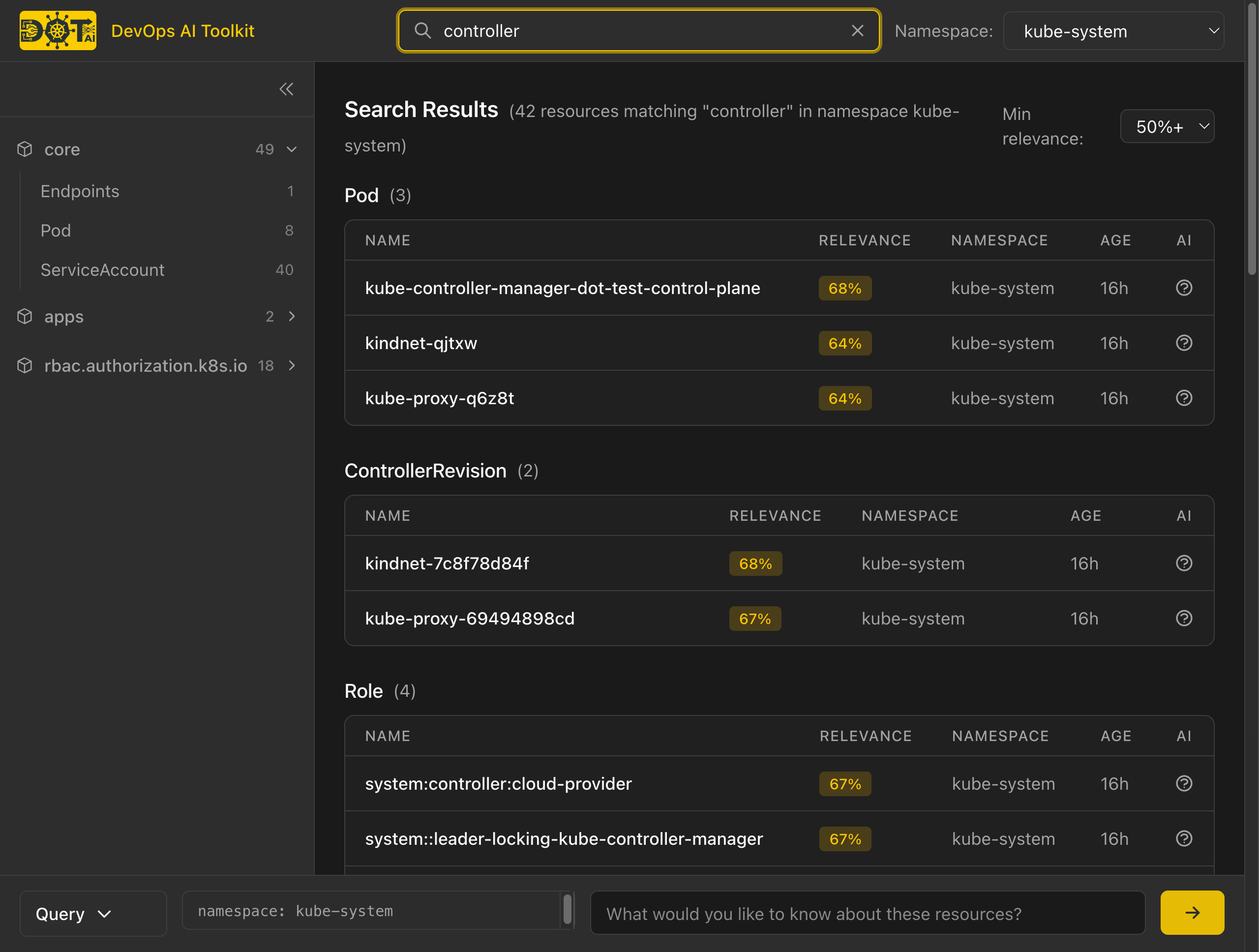
Key features:
- Resource Browser: Navigate resources by API group in the collapsible sidebar
- Namespace Filtering: Filter all views by namespace using the dropdown
- Semantic Search: Find resources using natural language queries (Cmd+K / Ctrl+K)
- Relevance Scoring: Search results ranked by semantic relevance with color-coded badges
- AI Action Bar: Query, Remediate, Operate, or Recommend actions available from any view
Architecture: The dashboard queries a Vector Database (Qdrant) instead of the Kubernetes API directly. This provides significantly faster response times on large clusters (thousands of resources) and enables semantic search across all resource types including CRDs. Live status data (pod phase, replica counts) is fetched from the Kubernetes API only for displayed resources.
Resource Details
Click any resource to view its details with multiple tabs:
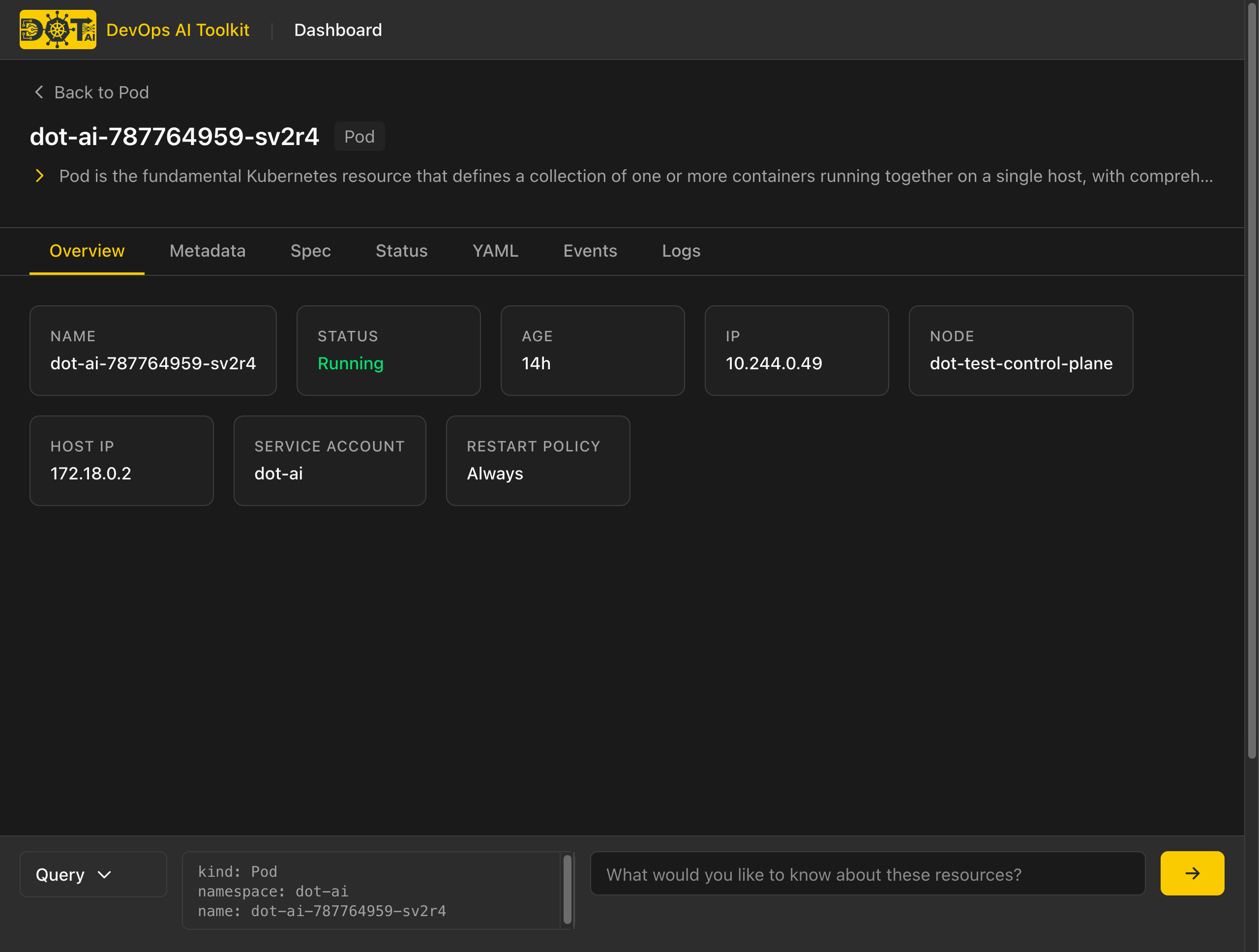
- Overview: Key information displayed as cards (status, age, IP, node, etc.)
- Metadata: Labels, annotations, owner references
- Spec: Resource specification (read-only)
- Status: Current status from Kubernetes API
- YAML: Full resource manifest with syntax highlighting and copy button
- Events: Related Kubernetes events (lazy-loaded)
- Logs: Container logs with tail/refresh (Pods only)
AI-Powered Operations
The Action Bar at the bottom of every page provides access to four AI tools. Select resources from the dashboard, type your intent, and let AI analyze or operate on your cluster.
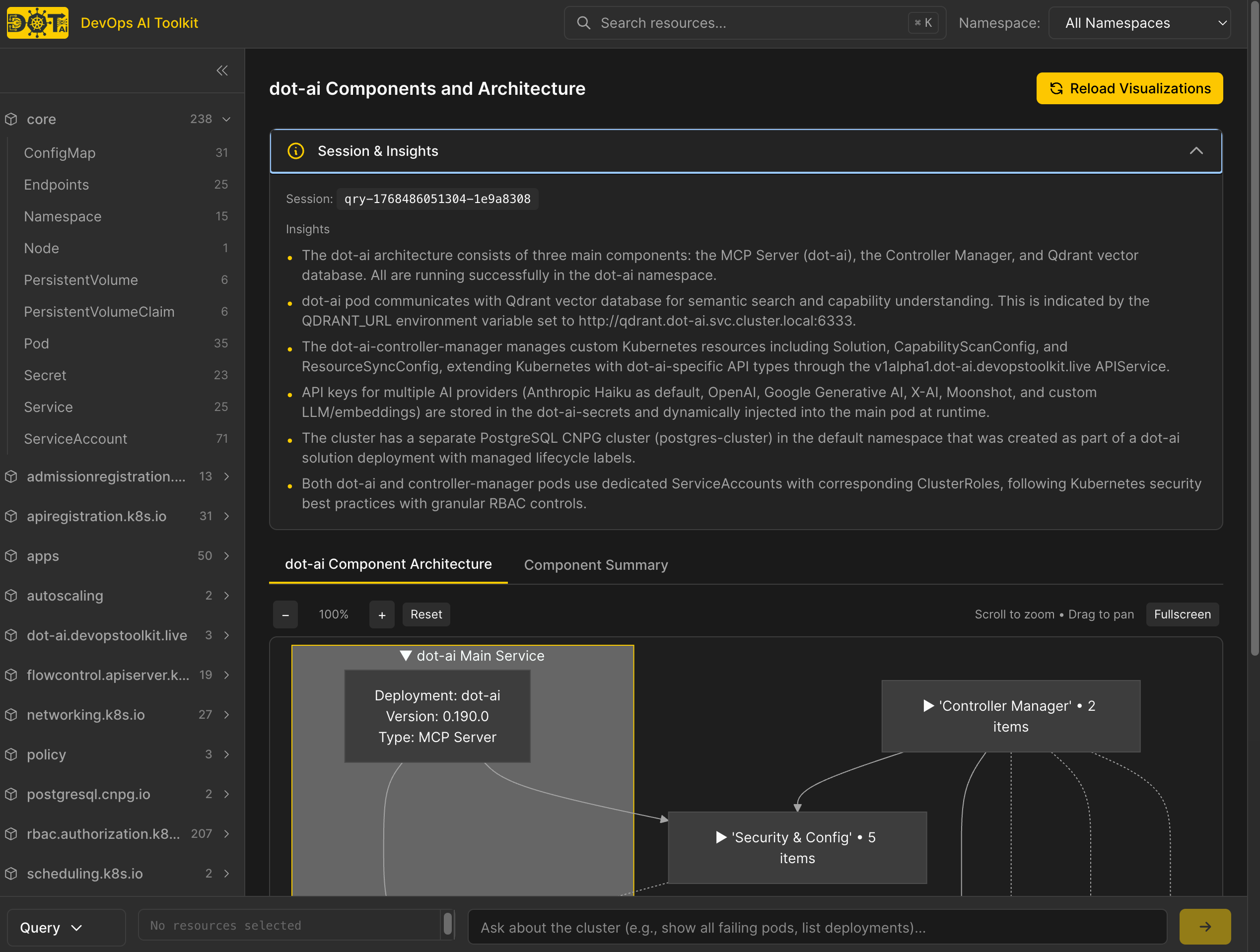
Query
Ask natural language questions about your cluster. Results include tables, diagrams, and insights.
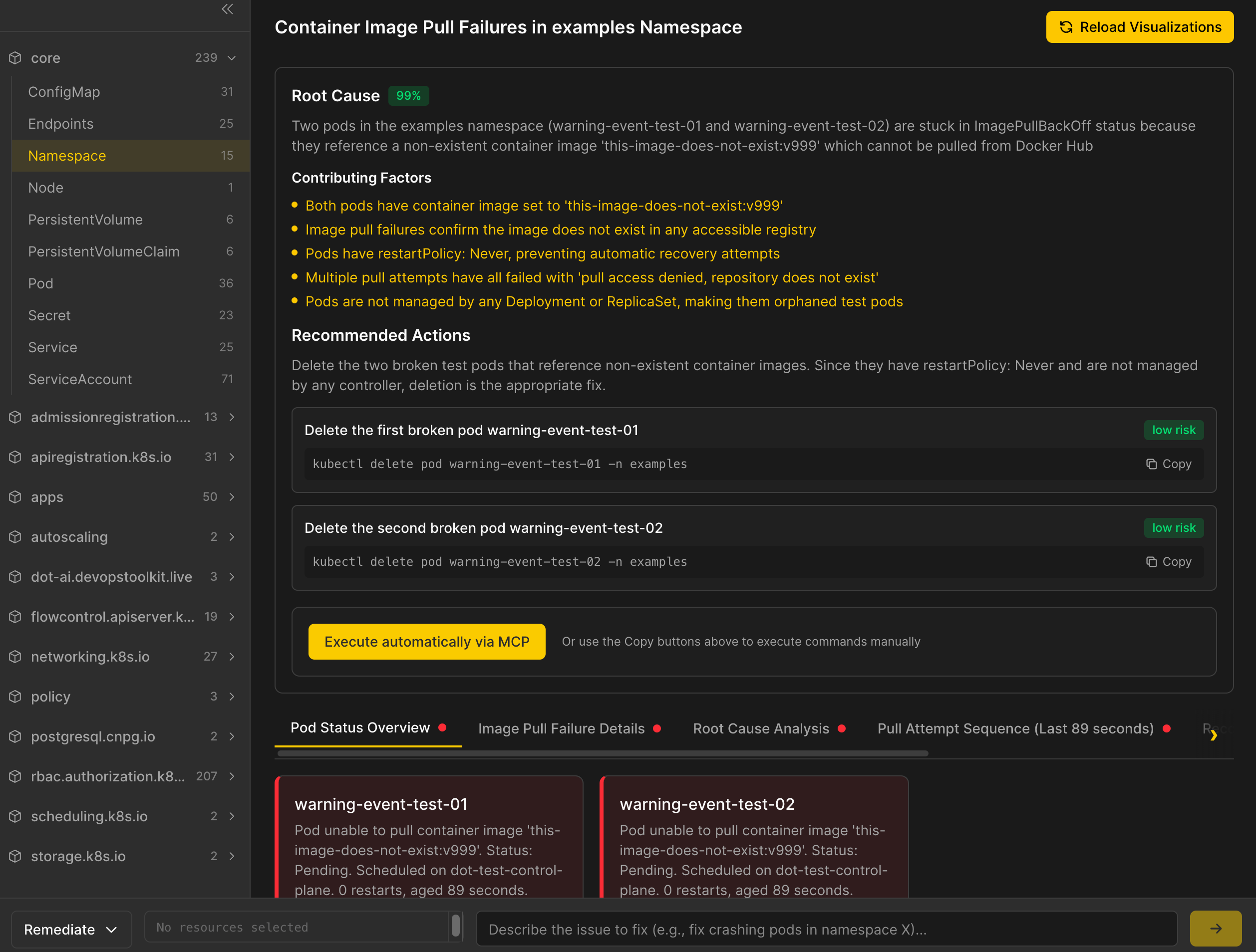
Remediate
Diagnose issues and get AI-generated fix suggestions. The workflow shows root cause analysis, contributing factors, and recommended actions with risk levels. You can execute fixes directly or copy commands for manual execution.
Operate
Perform Day 2 operations like scaling, updating, or rolling back. The AI shows proposed changes (creates, updates, deletes) with YAML previews and dry-run validation before execution.
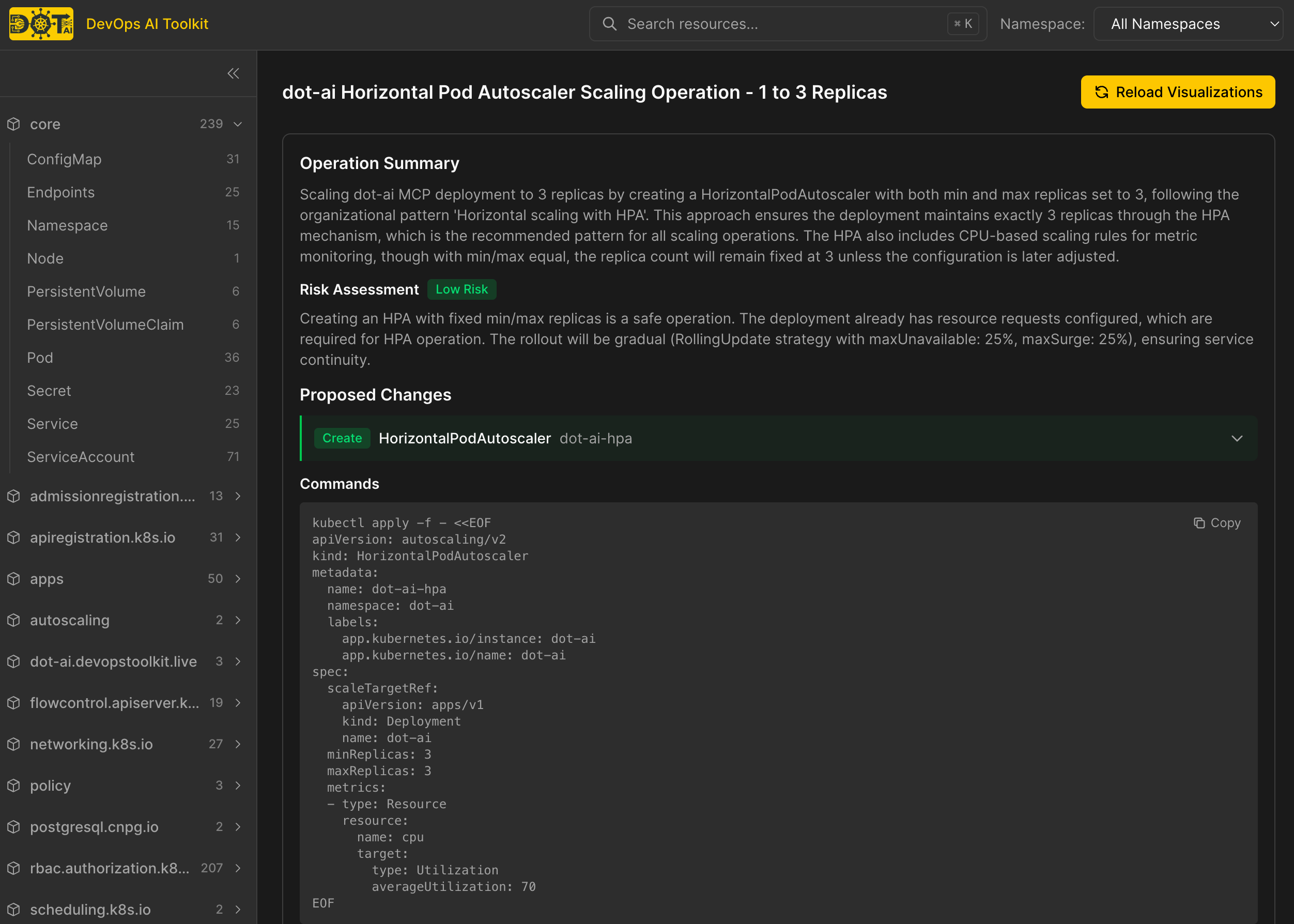
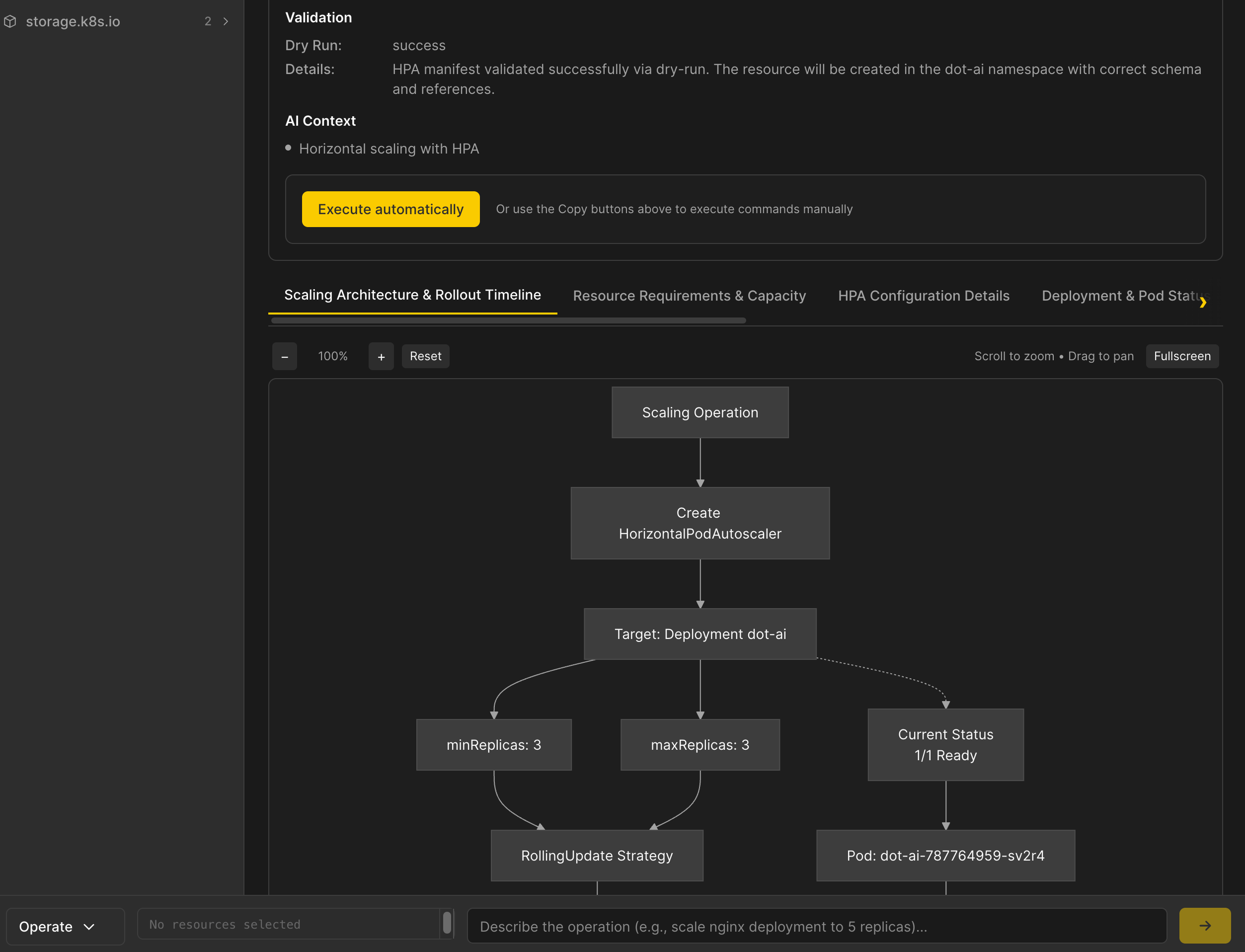
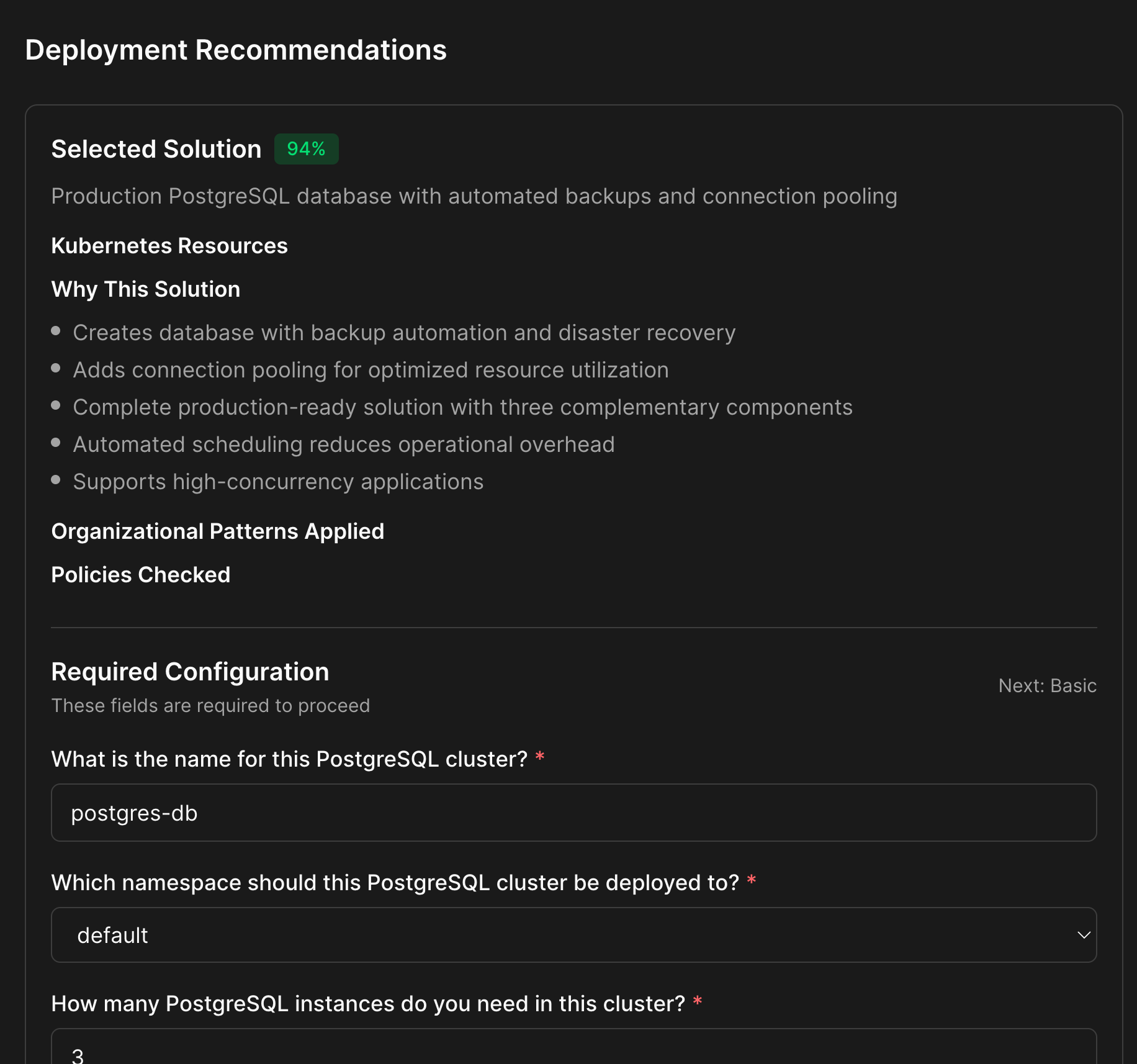
Recommend
Get deployment recommendations for new workloads. A multi-step wizard guides you through solution selection, configuration questions, and manifest generation. Download manifests or deploy directly to the cluster.
Visualization Companion
When using an MCP client (VS Code, Claude Desktop, etc.), AI responses can include visualization URLs. Opening these URLs renders rich visual representations.
How it works:
1. User in MCP client: "show me resources in production namespace"

2. MCP server responds with visualization URL:
   "Here are the resources in production:
   View visualization: https://ui.example.com/v/session-abc123"

3. User opens URL in browser to see diagrams, tables, and insights

4. User returns to MCP client to continue conversation
Authentication
The dashboard supports two authentication methods: OAuth/SSO (recommended) and bearer token (fallback).
OAuth / SSO Login (Recommended)
When the dot-ai MCP server has OAuth enabled (Dex as OIDC provider), the Web UI automatically detects it and offers SSO login:
- On first visit, users see a login page with a "Login with SSO" button
- Clicking it redirects to the Dex login page (supports Google, GitHub, LDAP, and other enterprise IdPs)
- After authenticating, the user is redirected back to the dashboard
- The user's email is displayed in the sidebar
OAuth is enabled automatically — no extra configuration needed. The Express backend registers itself as an OAuth client with the MCP server on startup using RFC 7591 Dynamic Client Registration.
Bearer Token Login (Fallback)
If OAuth is not available, or if users prefer token-based access, the login page also offers a "Login with Token" tab:
- On first visit, users see a login page prompting for an access token
- The token is validated by the server (
POST /api/v1/auth/login) - Once authenticated, the server stores the credential in an
HttpOnly,SameSite=Strictsession cookie (Secureover HTTPS), so page scripts cannot read it. SSO logins get the same cookie from the OAuth callback. Static-token sessions last 8 hours; SSO sessions last as long as the access token - The browser sends the cookie with every API request automatically. Scripts and other non-browser clients can call the API with an
Authorization: Bearer <token>header instead
When users reach the UI over HTTPS, the cookie must be marked Secure. The server detects HTTPS from X-Forwarded-Proto, which some proxy chains get wrong (for example, a cloud load balancer that terminates TLS in front of the ingress controller). Set DOT_AI_UI_SECURE_COOKIES=true (Helm: uiAuth.secureCookies=true) to always issue a Secure cookie. The chart sets it automatically when it configures TLS itself. Use false only for plain-HTTP installs.
SSO sign-in is bound to the browser that started it: the callback is rejected unless it arrives in the same browser that opened /auth/login, so a sign-in link from someone else cannot log you into their account. If the session ends while a tab is open (it expired, or you signed out in another tab), the tab returns to the login page.
Getting your token:
- If
uiAuth.tokenoruiAuth.secretRefis configured in Helm values, use that token - If neither is set, a random token is auto-generated at startup - check the pod logs:
kubectl logs -n dot-ai deployment/dot-ai-ui | grep "Auth token"
See Kubernetes Setup for configuration options.
User Management
When OAuth is enabled, admins can manage Dex static users directly from the Web UI.
Navigate to Users in the sidebar to:
- List users: See all registered users in a table
- Create user: Add a new user with email and password
- Delete user: Remove a user with a confirmation dialog
Changes take effect immediately through the dot-ai server's user management API.
Quick Start
Recommended: For the easiest setup, install the complete dot-ai stack which includes all components (MCP server, Web UI, and Controller). See the Stack Installation Guide.
Continue below if you want to install this component individually (for non-Kubernetes setups or granular control).
Prerequisites
- Kubernetes cluster with dot-ai MCP server deployed
- Helm 3.x installed
Deploy Web UI
# Set the version from https://github.com/vfarcic/dot-ai-ui/releases
export DOT_AI_UI_VERSION="..."

# Use the same auth token as your dot-ai MCP server
export DOT_AI_AUTH_TOKEN="your-dot-ai-auth-token"

# Token for UI login
export DOT_AI_UI_AUTH_TOKEN="your-ui-access-token"

helm install dot-ai-ui \
  oci://ghcr.io/vfarcic/dot-ai-ui/charts/dot-ai-ui:$DOT_AI_UI_VERSION \
  --set dotAi.url="http://dot-ai:3456" \
  --set dotAi.auth.token="$DOT_AI_AUTH_TOKEN" \
  --set uiAuth.token="$DOT_AI_UI_AUTH_TOKEN" \
  --set ingress.enabled=true \
  --set ingress.host="dot-ai-ui.127.0.0.1.nip.io" \
  --namespace dot-ai \
  --wait
Configure dot-ai MCP Server
Update your dot-ai MCP server to include visualization URLs in responses:
helm upgrade dot-ai-mcp oci://ghcr.io/vfarcic/dot-ai/charts/dot-ai:$DOT_AI_VERSION \
  --set webUi.baseUrl="http://dot-ai-ui.127.0.0.1.nip.io" \
  --namespace dot-ai \
  --reuse-values
Documentation
- Kubernetes Setup - Complete Helm installation guide with TLS and Gateway API options
Support
- GitHub Issues: Bug reports and feature requests
Related Projects
- dot-ai - DevOps AI Toolkit MCP server
- dot-ai-controller - Kubernetes controller for autonomous operations
DevOps AI Toolkit Web UI - Rich visualizations for AI-powered DevOps workflows.